QUESTIONS? Send us an email
Troubleshooting guide
Welcome to the MPN PROGRESSion Registry™!
This is just the beginning — it’s an evolution
The MPN PROGRESSion Registry™ is just getting started! We’re thrilled to have you among our founding group of enrollees. Your participation is incredibly special. You’re not just signing up; you’re helping build something that will make a lasting impact and help shape the future of MPN research.
As with any new technology launch, a few bumps are expected and are part of the process. Your questions and feedback will help us determine improvements together, so we can make ongoing updates that benefit all participants. All while we continue to collect these important key insights into MPNs. Please peruse the list of common troubleshooting items below to see if your question may be answered.
If you are experiencing any difficulties with your enrollment process, connecting your records, or your participant portal, we want to make sure you know we are here to help (email link). Your inquiries are secure and handled discreetly to respect your privacy.
We are so grateful for your patience and commitment as we evolve the MPN PROGRESSion Registry. Thank you for being here from the very beginning!
Having difficulty registering? Try these simple fixes.
The MPN PROGRESSion Registry™ is designed to work in Google Chrome, Microsoft Edge or Apple Safari browsers. For the most seamless experience, we recommend using one of these three browsers.
If you are experiencing display issues, or having trouble loading the pages of the MPN PROGRESSion Registry™, clearing your browser history can help. Instructions for commonly used browsers are below:
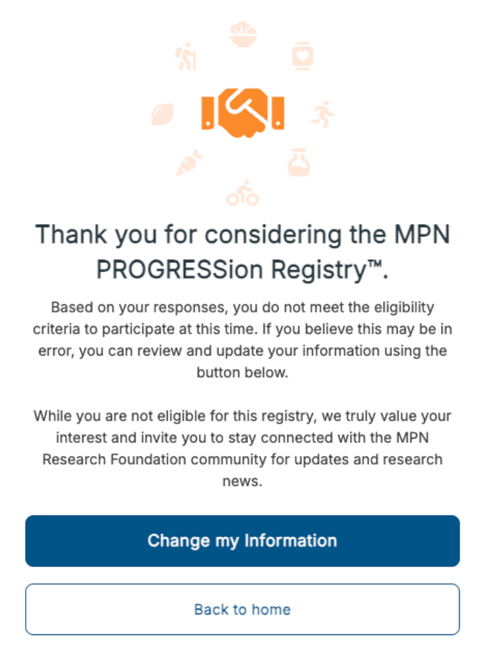
If a message pops up during your initial eligibility screening indicating that ‘you do not meet the eligibility criteria to participate at this time’ — and you believe that you qualify — you can:
Because of how the MPN PROGRESSion Registry™ is designed, there are certain eligibility requirements participants must meet in order to enroll. If you do not meet the study criteria and are designated ineligible for participation at this time, please know how much we appreciate your interest. We hope you’ll stay connected with our community. Your involvement is important to us.
We’re continually working to improve and expand the Registry, and the official eligibility criteria may evolve over time.
If you have additional questions about your eligibility, or would like to understand more about your status, please feel free to contact us at research@mpnrf.org.
We understand it may feel duplicative to have to enter your information in two separate places. This is intentional and designed to protect your privacy.
Because the MPN PROGRESSion Registry™ operates similarly to a clinical trial, we must keep your personal and identifying data separate from your medical data. This ensures your information is handled securely and ethically.
The first form asking for your basic contact information is for MPN Research Foundation, so we may keep you up to date on all of the latest Registry news, events and research. The second is part of the enrollment and informed consent process within the secure Registry portal.
Each health system can have unique rules around data sharing. When connecting your electronic records, you may see the option to check boxes that select specific areas of your medical records to share with the MPN PROGRESSion Registry™. You will also see an option asking how long you would like to share information with the Registry.
This helps ensure we collect only what’s necessary for meaningful research, and gives you control over what you share, and for what duration.
Your records are vital to advancing MPN research, and we’re committed to handling them with care and confidentiality.
If you find your health system: Proceed to add that system. You should then be prompted to connect to your EMR and be taken outside of the Registry to sign into the EMR portal associated with your provider’s practice.
If you are unable to locate the health system where your provider is located: Please scroll to the bottom of the page and select the blue hyperlink that says “I do not see my healthcare provider.” You will be prompted to manually add your providers information. This will ensure that your provider and practice are linked to your MPN PROGRESSion Registry™ profile.
*Note: For this to work, you must first have an active EMR portal log in and account. If you need this, please reach out to your provider’s office directly for help setting this up.
*Note: Manual connections are added on an ongoing basis. The electronic records will be connected at a future time, but your work is done! Congratulations!
If you have done the above and you are still having difficulty linking your Electronic Medical Record (EMR):
Please contact us at research@mpnrf.org. We’ll help troubleshoot and guide you through the process.
HAVE QUESTIONS OR NEED HELP?
Send us an email or call 773-977-7216, and we will get back to you within two business days to provide assistance.